Pick-to-Light: How It Works, Benefits & Uses [+ FAQs]
Finding and keeping skilled warehouse workers isn’t getting any easier. In fact, supply chain leaders continue to rank workforce challenges among their top concerns.
For warehouses handling high order volumes, that makes efficient picking especially important.
Workers need to locate the right products quickly and accurately without spending unnecessary time searching through racks or checking paper pick lists.
Pick-to-light systems can simplify this process by using illuminated displays to guide workers directly to the right picking location and show them how many items to retrieve.
By providing clear visual instructions at the point of pick, this technology can help speed up order picking, reduce errors, and make the process easier for new workers to learn.
In this article, we will:
- Break down how light-directed picking works and the components behind it
- Explore its benefits and real-world use cases across warehouse operations
- Compare pick-to-light with other picking methods and explain what to consider when choosing a system
Understanding Pick-to-Light
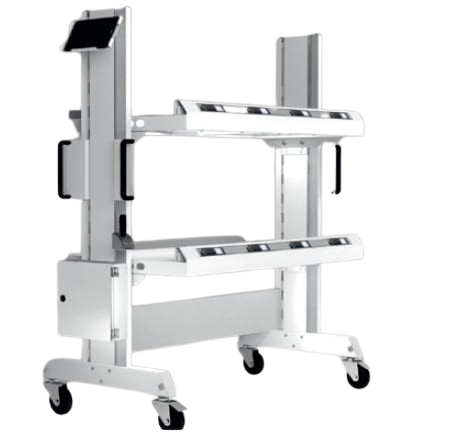
Pick-to-light is a paperless order-picking technology that uses illuminated indicators and numerical displays to guide warehouse workers to the correct storage location and specify the quantity to be picked.
Integrated with a warehouse management system (WMS), the system translates order data into real-time visual picking instructions, helping reduce search time and streamline order fulfillment.
How Does Pick-to-Light Work?
Instead of relying on paper lists or searching through racks, pick-to-light points workers in the right direction using visual cues.
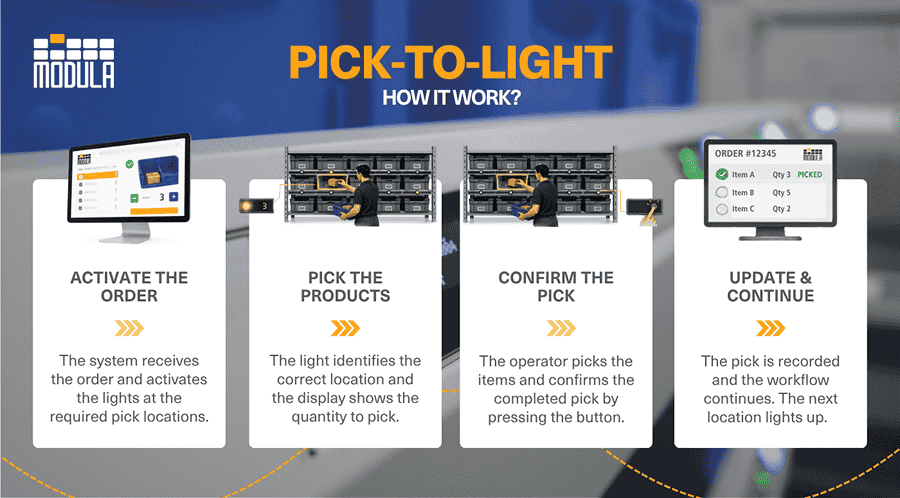
Order Activation
The process starts when an order is ready for picking.
The system identifies the products needed and activates the lights at their storage locations. Instead of searching through racks or checking a paper list, the picker can simply follow the lights.
Picking the Products
The display then shows the required quantity as soon as the picker reaches the illuminated location.
After removing the items, the picker confirms the action by pressing a button or scanning a barcode. The light then turns off, signaling that the pick is complete.
Updating Inventory
Each confirmed pick is automatically recorded in the system, allowing inventory levels to be updated in real time.
Each confirmed pick is recorded and communicated back to the connected warehouse inventory management.
Depending on the integration and system configuration, this data can be used to update inventory records and provide real-time visibility into picking activity.
This helps warehouse teams keep track of available stock and know when products need to be picked or replenished.
Handling Multiple Orders
Light directed picking can also handle multiple orders and pickers at once.
Depending on the configuration, different light colors or indicators can be assigned to specific workers or orders, helping operators distinguish between simultaneous picking tasks.
This can help teams maintain an efficient workflow during periods of higher order volume.
Pick-to-Light vs. Put-to-Light: Key Differences
Both systems use lights to guide workers, but they come into play at different points in the fulfillment process.
The easiest way to tell them apart is to look at where the lights lead: pick-to-light guides workers to the products they need, while put-to-light shows them where those products need to go.
| Comparison | PICK-TO-LIGHT | PUT-TO-LIGHT |
|---|---|---|
| Main purpose | Helps workers retrieve items from storage | Helps workers sort items into individual orders or destinations |
| Worker direction | Guides the worker to the product | Guides the worker to the correct order container |
| How it works | A storage location lights up and displays the quantity to pick. The worker collects the items and confirms the pick. | A worker scans a batch-picked item, and the system lights up the cubby, tote, or order box where it belongs. |
| Where it is used | Shelves, racks, bins, and other picking areas | Put walls, consolidation areas, and sorting stations |
| Ideal for | Fast-moving inventory, high-volume picking, and whole-order picking | Batch and multi-order picking, order consolidation, and sorting |
| Advantages | Reduces the time workers spend locating products | Makes it faster and easier to sort batch-picked items into the right order |

Pick-to-Light vs. Other Picking Methods
There’s no single picking method that works best for every warehouse. The right choice depends on order volume, SKU range, warehouse layout, and how often inventory changes.
From light-directed systems and voice systems to RF scanning and pick-by-vision, each order picking methods has different strengths and considerations.
Comparing them side by side can help determine which approach best fits the operation.
| METHOD | HOW IT WORKS | BEST FOR | KEY ADVANTAGE | CONSIDERATIONS |
|---|---|---|---|---|
| Pick-to-light | Lights guide workers to items and quantities | High-volume and high-demand SKUs | Fast and easy to follow | Requires hardware at picking locations |
| Pick-by-voice | Headsets provide spoken picking instructions | Hands-free picking | Keeps hands and eyes free | Can be affected by noise |
| RF scanning | Handheld or wearable devices guide and verify picks using barcodes | Operations with changing SKUs and locations | Flexible and accurate | Requires interaction with a scanning device |
| Pick-by-vision | Smart glasses display picking instructions | Mobile picking and complex workflows | Hands-free visual guidance | Can require more specialized hardware and integration |
| Paper-based | Workers follow printed pick lists | Simple, low-volume operations | Simple, low-volume operations | Slower and more error-prone |
Core Pick-to-Light Components
A pick-to-light system is more than a row of flashing lights. Numerous hardware and software components work together to turn order data into clear picking instructions for warehouse workers.
Light Modules
Light modules are installed at individual storage locations and serve as the main point of interaction for pickers.
They typically include an LED indicator, a display showing the quantity to pick, and a button for confirming the task.
More advanced pick-to-light solutions also include multiple buttons, colored LEDs, or additional displays to support functions, such as:
- Quantity adjustments
- Shortage reporting
- Distinguishing between different orders and pickers
Controllers
Controllers act as the link between the light modules and the rest of the system.
They manage the flow of data and signals, making sure the correct lights turn on at the right time and that completed picks are sent back to the warehouse system.
WMS and Integration Software
The software is what keeps the entire process connected.
By integrating with a warehouse management system (WMS) or enterprise resource planning (ERP) platform, the pick-to-light system receives order information, sends instructions to the appropriate light modules, and communicates completed picks back to the connected system.
This helps keep picking activity and order information synchronized as work moves through the warehouse.
Barcode Scanners
Barcode scanners are often used to start or verify a picking task.
For instance, a worker might scan an order, tote, or carton before beginning. The system then activates the lights associated with that order, giving the picker a clear path to follow.
Power and Connectivity
Finally, the light modules need a reliable way to communicate and receive power. Depending on the setup, systems might use wired connections or wireless technology.
A stable connection is important because picking instructions and confirmations need to move quickly between the modules and warehouse software.
Pick-to-Light in Warehouse Operations: 3 Top Use Cases
Pick-to-light can support different workflows across warehouse and manufacturing operations, especially where workers handle frequent, repeatable picks.
See how light-directed picking fits into different warehouse workflows:
eCommerce Order Fulfillment
In eCommerce order fulfillment, orders arrive fast and in high volume.
Picture a picker walking down an aisle lined with bins of phone cases, chargers, and other small products.
As an order comes through, the right locations light up one after another, each display showing the quantity needed. The picker follows the lights, grabs the items, confirms each pick, and keeps moving.
That speed matters even more as eCommerce orders climb. A recent report projects the pick-to-light market will reach $1 billion by 2030, driven largely by growing e-commerce demand.
Retail Store Replenishment
Imagine a distribution center getting orders ready for dozens of retail stores. A light turns on above a bin of cosmetics and displays 8, letting the worker know to pick eight units.
A few steps away, another light directs them to the next product.
Instead of repeatedly checking a list for locations and quantities, the worker can follow the visual cues to build each store’s replenishment order.
Parts Picking for Manufacturing
On a manufacturing floor, even one missing component can hold up assembly.
A worker preparing a parts kit might see lights appear above separate bins containing screws, connectors, and fittings, with each display showing exactly how many are needed.
They collect and confirm each part before sending the completed kit to the production line. This gives workers a simple visual check that helps prevent missing or incorrect components.
Benefits of Light Directed Picking
Light directed picking takes a lot of the back-and-forth out of picking. It optimizes the process by guiding workers directly to each pick and showing them exactly what they need.
As one of the more accessible warehouse automation trends, it delivers quick wins without a full system overhaul.
Here are some of the key benefits of pick-to-light technology:
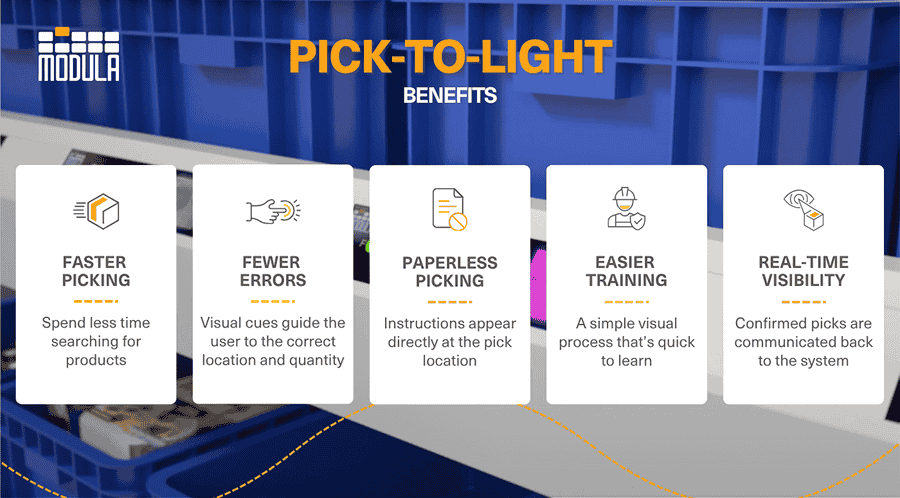
Faster Picking
Workers can simply follow the lights from one location to the next instead of constantly checking a paper list or handheld device.
This minimizes time spent searching for products and helps warehouses process more orders during busy shifts, improving overall turnaround time in logistics.
Research backs this up. One study involving 71 participants found that pick-to-light was the fastest method tested and the quickest for new employees to learn.
Fewer Picking Errors
Each light directs the worker to a specific location, while the display shows the quantity to pick.
These visual cues make it easier to avoid common mistakes, such as picking from the wrong bin or grabbing the wrong number of units.
Paperless and Hands-Free
Picking instructions appear directly at the storage location, reducing the need for workers to carry printed pick lists or repeatedly consult a handheld device.
This keeps instructions visible at the point of pick and simplifies the interaction between the worker and the picking system.
Easier Training
The process is straightforward: follow the light, pick the displayed quantity, and confirm the task.
Since there are fewer steps to learn, new or seasonal workers can get comfortable with the workflow more quickly.
Real-Time Pick Visibility
Once a worker confirms a pick, the system sends that information back to the connected WMS.
This gives warehouse teams a more current view of picking progress and, depending on the system configuration, inventory activity.
How To Choose the Right Pick-to-Light Solutions
Before choosing a system, think about how your team actually picks, from the products moving through your racks to the software running behind the scenes.
Start With Your Picking Volume
Consider how many orders and picks your team handles each day, how frequently individual locations are picked, and what happens during peak periods.
A larger operation might need a system that can support multiple pickers and orders at once, while a smaller picking zone might only require a basic setup.
Look at Your SKUs and Picking Patterns
Light directed picking tends to work best when workers frequently pick from the same group of high-turnover inventory.
If your products move around often, choose a system that lets you easily add, move, or rearrange light modules as your inventory and picking areas change.
Consider Your Warehouse Layout
Think about how the system will fit into your actual picking area.
Shelves, bins, carton flow racks, and workstations might all need different types of light modules or mounting setups.
The lights should be easy to see and reach without getting in the way of workers as they pick.
Check WMS and ERP Compatibility
The lights need to work smoothly with the software already running your warehouse.
Check whether the pick-to-light system can connect directly to your WMS or ERP and exchange key data such as order details, SKU locations, pick quantities, confirmations, and inventory updates.
For example, when a worker confirms a pick, that information should flow back to the WMS without requiring someone to enter it manually.
Compare the Light Modules
Look closely at what each light module lets the picker do.
The display should be large enough to read quantities quickly, while the buttons should be easy to reach for confirming picks or adjusting quantities when stock is short.
If several workers share the same picking zone, colored LEDs can help each person quickly identify which locations belong to their order.
Think About Installation, Maintenance, and Scalability
Some systems rely on wired modules, while others offer wireless options.
Wired systems can provide consistent power and connectivity but may take more effort to install or rearrange.
Wireless systems can offer more flexibility but introduce considerations such as battery life and network reliability.
Also consider how easily the system can expand or be reconfigured if you add new pick locations, change your layout, or increase order volume.
How Modula Supports Light Directed Picking in Your Warehouse
Modula supports light-directed picking through integrated picking technologies designed to help operators work faster, reduce errors, and keep order fulfillment processes connected.
Pick-to-Light integration: Pick-to-light technology can be integrated into warehouse picking workflows to guide operators to the correct picking location and display the quantity to retrieve. Connected warehouse software keeps picking instructions and confirmations coordinated with the wider fulfillment process.
Modula also offers Put to Light, which uses visual guidance at a different stage of the process.

While Pick-to-Light guides operators to the products they need to retrieve, Put to Light directs them to the correct order location where those items need to be placed.
Modula Put to Light supports batch and multi-order picking and can be integrated with automated storage and other picking solutions.
Our Modula Put to Light allows you to:
- Multiple order locations: Operators can work across several order locations at once, making it easier to handle batch and multi-order picking.
- Put-to-Light displays: Each order location has its own display, giving workers a clear visual cue for where each picked item belongs.
- Light-guided validation: Scan or touch-light validation adds an extra verification step, helping operators confirm that items go to the correct destination.
- Instant updates: Pick confirmations and order activity are updated in real time, giving teams better visibility into inventory and order progress.
- Flexible integration: The system can connect with existing storage structures, automated storage and retrieval systems, picking stations, and picking carts.
- WMS and ERP connectivity: Modula Put-to-Light works with Modula WMS and can interface with other WMS and ERP systems, keeping picking data connected with the rest of the operation.
- Scalable installation: The system can be installed as a stand-alone solution or paired with other picking technologies, giving warehouses room to adapt the setup as their operation grows.
Pick-to-Light Explained: Key Takeaways
- Pick-to-light simplifies order picking: Lights guide workers to the correct storage location and display the quantity to retrieve, reducing the need to search for products or rely on paper pick lists.
- The right system depends on the operation: Picking volume, SKU movement, warehouse layout, light module configuration, scalability, and WMS or ERP compatibility should all be considered when choosing a pick-to-light solution.
- Pick-to-light and Put-to-Light serve different purposes: Pick-to-light guides workers to the products they need to retrieve, while Put-to-Light directs picked items to the correct order or destination. The two technologies can also complement each other within the same fulfillment workflow.
Pick-to-Light: FAQs
How accurate is pick-to-light?
Pick-to-light can improve picking accuracy by giving workers a clear visual cue for both the location and quantity required.
However, accuracy still depends on factors such as correct inventory placement, system configuration, and whether workers properly confirm each pick.
What types of products work best with pick-to-light?
Pick-to-light works particularly well for frequently picked products stored in fixed or relatively stable picking locations.
Products such as electronics, cosmetics, pharmaceuticals, spare parts, and small components stored in bins, shelves, or carton flow racks can be good candidates.
The system can support different product types, but its effectiveness depends more on picking frequency, SKU movement, and warehouse layout than on the product category itself.
Can pick-to-light integrate with an existing WMS?
Yes. Pick-to-light systems can integrate with warehouse management systems and other warehouse software to receive order information and communicate completed picks.
Integration requirements vary by system, so businesses should confirm compatibility with their existing software and determine what order, location, and picking data needs to be exchanged.
Can pick-to-light work during a power or system outage?
Since light directed picking relies on electronic displays and connected software, an outage can interrupt normal picking.
Warehouses should have a backup process in place, such as RF scanners or manual pick lists, so orders can continue moving until the system is restored.