WES vs. WMS vs. WCS: Differences & How They Work Together
Smart warehouses rely on more than inventory racks, warehouse equipment and individual automation systems. They also need software that can manage inventory, coordinate workflows, and control automated equipment across the warehouse.
That is where systems like WMS, WES, and WCS come in.
While the acronyms might sound similar, each system plays a very different role.
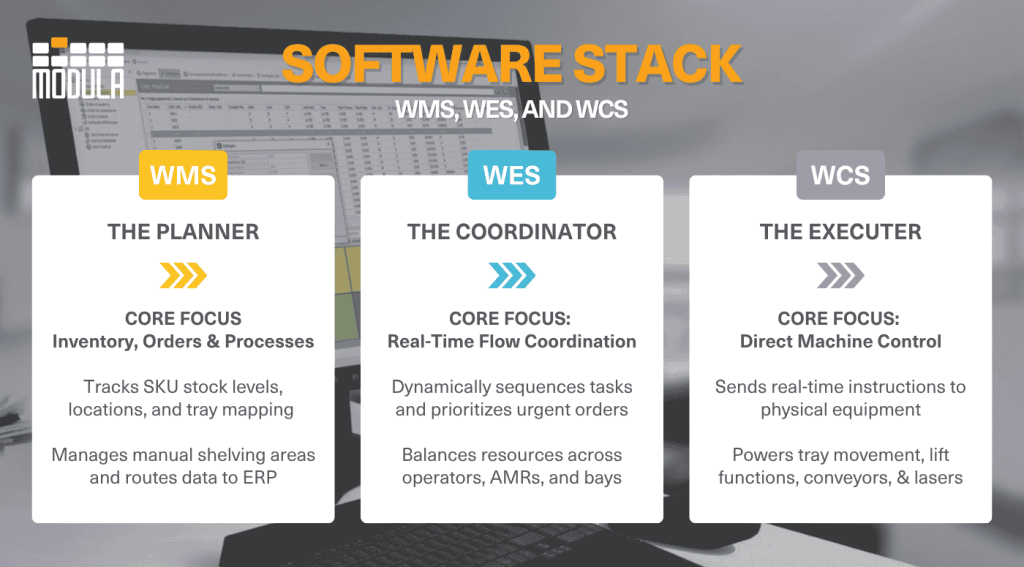
A warehouse management system (WMS) manages inventory, orders, and warehouse operations. A warehouse execution system, or WES, coordinates work across people, systems, and automation. A warehouse control system, or WCS, controls automated equipment in real time.
In many modern warehouses, all three systems work together.
The WMS manages inventory and orders, the WES helps coordinate workflows and the WCS sends real-time instructions to automation equipment such as conveyors, sorters, robots, and automated storage systems.
In this article, we will:
- Break down the differences between WES vs. WMS, WES vs. WCS, and WCS vs. WMS
- Explain how they work together
- Discover how Modula helps connect these systems into a smarter warehouse operation
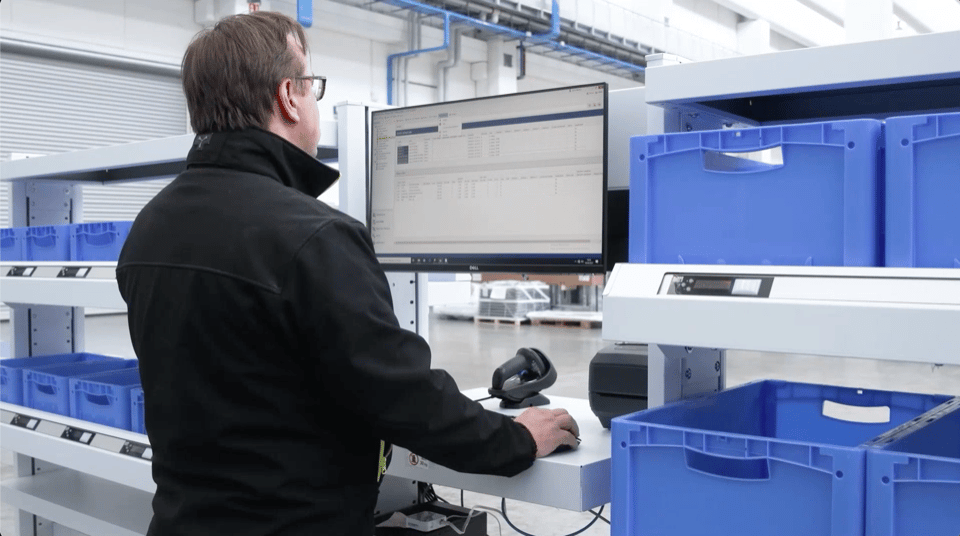
Connect inventory management, workflows, and automated solutions with Modula.
Warehouse Management System (WMS) Explained
Think of a warehouse management system (WMS) as the central hub of your warehouse operations.
It helps manage everything from receiving and put-away to storage, order picking, packing, and shipping, while also collecting valuable data that can be used to improve performance over time.
One of the biggest advantages of a WMS is its ability to work alongside other business systems, such as Enterprise Resource Planning (ERP) and Document Management System (DMS) platforms.
By sharing data across the supply chain, these systems help businesses respond faster to demand changes, improve coordination, and keep operations running smoothly.
Of course this is not the full picture, learn everything about how a WMS works with Modula’s complete guides.
Warehouse Execution System (WES) Explained
A warehouse execution system (WES) helps keep warehouse operations running smoothly and efficiently throughout the day.
It sits between the warehouse management system, which handles planning and inventory oversight, and the warehouse control system software, which manages automation equipment.
The WES coordinates day-to-day activities on the warehouse floor by directing workflows, prioritizing tasks, and balancing resources.
By connecting warehouse employees, systems, and automation, it improves efficiency, reduces idle time, and supports faster order fulfillment.
Warehouse Control System (WCS) Explained
A warehouse control system (WCS) is the software layer that directly controls a facility’s automated equipment. Unlike higher-level planning software, a WCS operates at the machine level to execute physical movements in real time.
Warehouse control system software connects and synchronizes automated equipment, such as conveyors, sorters, automated storage and retrieval systems (ASRS), and warehouse robots, with live operational data.
By managing equipment routing, tray movements, and sensor inputs, the WCS helps materials move efficiently across the facility, reduces delays, and keeps automated systems operating accurately.
WES vs. WMS vs. WCS: Key Differences
Each system brings something different to the warehouse floor. Here’s how they stack up:
| Feature | WMS | WES | WCS |
|---|---|---|---|
| Main role | Manages warehouse operations | Coordinates warehouse execution | Controls automation equipment |
| Main focus | Inventory, orders, locations, and processes | Workflow coordination, task prioritization, and resource balancing | Machine-level control and equipment movement |
| Typical processes | Receiving, put-away, inventory tracking, picking, packing, shipping, replenishment, and reporting | Order release, task sequencing, workload balancing, exception handling, and workflow coordination | Conveyor movement, sortation, tray retrieval, lift operation, sensor inputs, and automation commands |
| Works with | ERP, order management systems, eCommerce platforms, operators, and warehouse equipment | WMS, WCS, operators, automation systems, and real-time operational data | Conveyors, sorters, ASRS, VLMs, AMRs, robots, sensors, and PLCs |
| Main goal | Improve inventory accuracy and warehouse visibility | Keep work flowing efficiently across the operation | Keep automated equipment moving accurately and reliably |

WMS vs. WES
A WMS focuses on managing inventory, orders, locations, and core warehouse processes. It helps warehouse teams know what inventory is available, where it is stored, and what needs to happen next.
A WES focuses on the execution of work across the warehouse. It helps coordinate tasks, prioritize work, balance resources, and keep people and automation moving efficiently.
In simple terms, the WMS helps manage the warehouse, while the WES helps coordinate how work gets executed throughout the day.
WMS vs. WCS
A WMS manages warehouse operations, including inventory, orders, receiving, picking, packing, shipping, and replenishment.
A WCS controls automated equipment in real time. It sends commands to technologies such as conveyors, sorters, robots, automated storage systems, and other material handling equipment.
In simple terms, the WMS manages what needs to happen in the warehouse, while the WCS helps make the physical automation happen.
How WMS, WES & WCS Work Together
WMS, WES, and WCS each have their own role in the warehouse, but they are most effective when they work together.
- Order fulfillment: The WMS manages incoming orders and inventory, the WES helps coordinate task priorities and workflows, and the WCS controls the automated equipment needed to move, retrieve, or route items through the warehouse.
- Inventory management: The WMS keeps track of inventory levels and product locations, the WES helps adjust picking and restocking tasks based on warehouse activity, and the WCS manages automated storage and retrieval movements when equipment is involved.
- Warehouse slotting and layout: The WMS helps determine where products should go, the WES helps keep tasks flowing smoothly to prevent bottlenecks, and the WCS directs automation equipment to move items efficiently.
- Workforce coordination: The WMS assigns or supports warehouse tasks, the WES helps balance workloads across the warehouse, and the WCS keeps automated systems working alongside employees efficiently.
- Warehouse visibility and reporting: Together, the WMS, WES, and WCS collect operational data and provide insights into warehouse performance, helping managers make faster and more informed decisions.
Which System Is Right for Your Warehouse?
The right system depends on how your warehouse operates and what you’re trying to improve. While WMS, WES and WCS often work together, each one serves a different purpose.
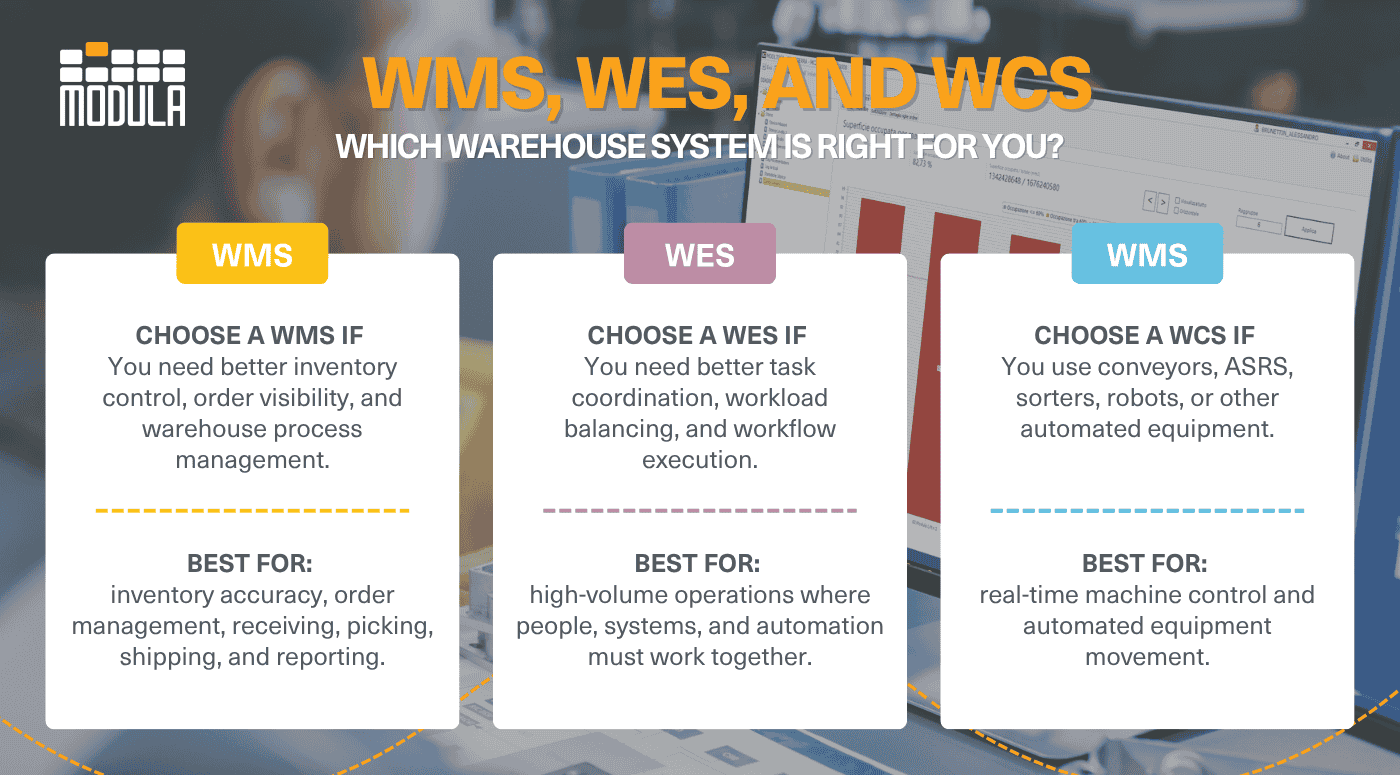
Choose a WMS if You Need Better Inventory Control
A warehouse management system (WMS) helps you manage inventory, orders, warehouse processes, and overall warehouse visibility.
If your main challenges involve inventory tracking, order accuracy, or improving day-to-day warehouse management, a WMS is usually the best starting point.
Choose a WCS if Your Warehouse Uses Automation
A warehouse control system (WCS) is designed for warehouses that rely on automation equipment like warehouse conveyors, sortation systems, ASRS, and warehouse robots.
It helps control and coordinate automated systems to keep products moving smoothly throughout the facility.
Safety Stock Management
A warehouse execution system (WES) focuses on keeping warehouse workflows efficient.
It helps coordinate tasks between employees, automation equipment, and warehouse systems by prioritizing work, balancing workloads, and supporting faster order fulfillment.
How Modula Fits Into the Stack of WES vs. WMS vs. WCS
Modula connects automated storage systems with warehouse software to support inventory management, picking workflows, and equipment operation.
To understand how Modula fits into a modern warehouse, it helps to look at the three main software layers involved: WMS, WES, and WCS.
Together, these systems allow warehouses to move from manual operations to fully synchronized automation.
WMS: Managing Inventory and Warehouse Operations
At the warehouse management level, the warehouse management system (WMS) manages inventory, orders, and warehouse processes.
The WMS manages:
- Inventory locations
- Order information
- SKU tracking
- Picking instructions
- Inventory replenishment workflows
When integrated with Modula units, the WMS communicates directly with the automated storage system to determine which items need to be retrieved, where they are stored, and how orders should be prioritized.
For example, once an order is released through an ERP or WMS platform, Modula automatically retrieves the correct tray and delivers it directly to the operator through a goods-to-person workflow.
WES: Coordinating Warehouse Execution
Sitting between the WMS and the physical automation layer is the warehouse execution system (WES).
If the WMS help define what needs to happen, the WES helps determine how the work should flow across the warehouse.
The WES coordinates activities between:
- Warehouse operators
- Modula VLMs
- Autonomous mobile robots
- Conveyors
- Picking stations
- Other automation systems
This layer becomes especially important in high-volume environments where multiple systems need to work together simultaneously.
As warehouse automation becomes more advanced, WES and WCS platforms are playing a larger role in coordinating workflows across connected systems.
In fact, a recent industry report found that growth in WES and WCS adoption is closely tied to increased warehouse automation investments, with the market projected to reach $60 billion by 2030.
During peak fulfillment periods, a WES coordinates Modula systems with other automation technologies by prioritizing urgent orders, balancing operator workloads, and synchronizing equipment such as autonomous mobile robots (AMRs) or conveyors to maintain maximum throughput and minimize area congestion.
WCS: Controlling the Automation Equipment
At the machine level, the warehouse control system software (WCS) handles direct control of physical automation equipment.
This includes:
- Tray movements
- Lift operations
- Conveyor routing
- Sensors
- Robotic interfaces
- Picking bay activity
The WCS is what actually makes the automation happen on the warehouse floor.
Modula offers dedicated software components at this exact machine-control layer:
- Modula Driver: Ideal for warehouses utilizing an external ERP or host WMS. The host software sends the order lists, and Modula Driver translates them into direct movement commands, displaying them on the Copilot touchscreen console for the operator to confirm.
- Modula Link: For total external automation control, Modula Link turns the VLM into a mechanical slave driven entirely by an external WMS or WES. Using standard API RESTful, XML, or ASCII protocols, the external host sends a request via TCP/IP sockets, and Modula Link activates the mechanical tray retrieval instantly.
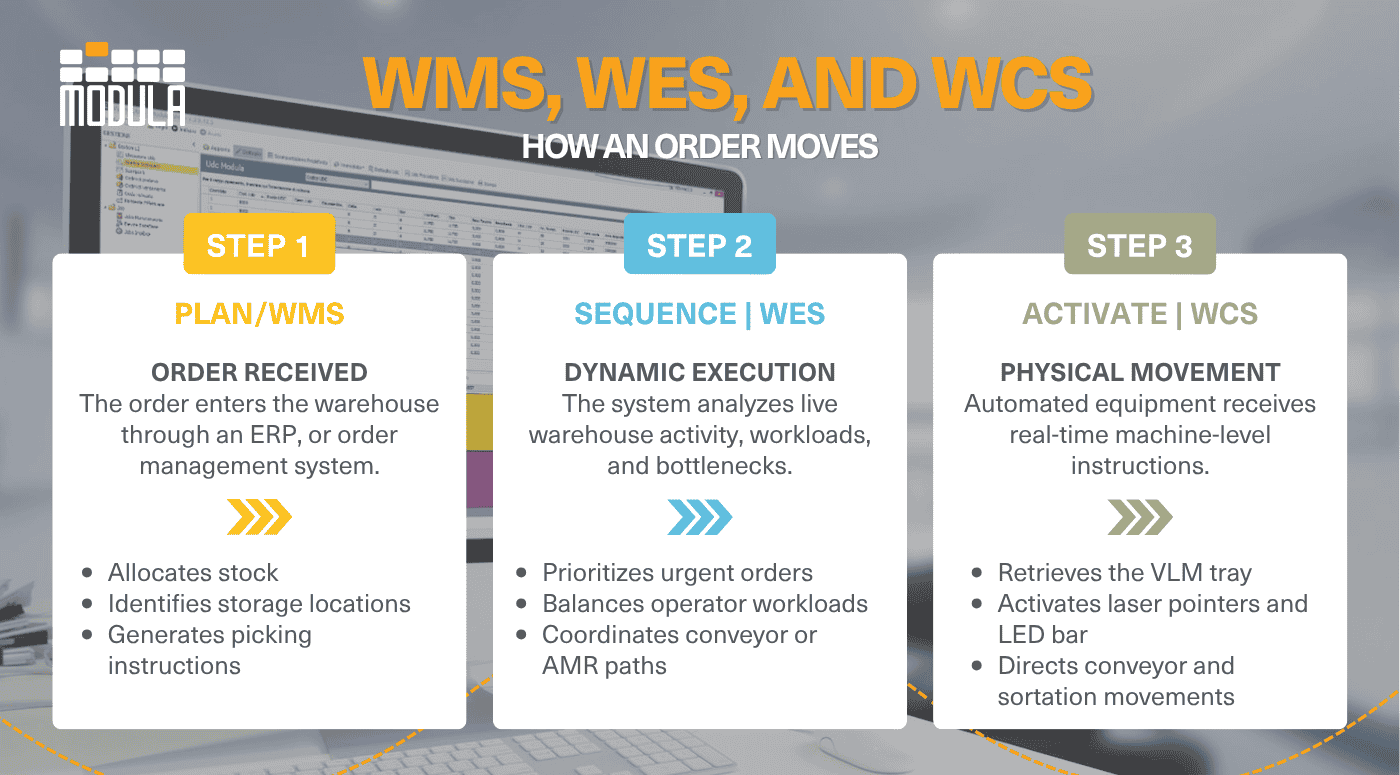
Consider this scenario: when an operator requests an item, the WMS identifies the correct SKU and storage location, and the WES prioritizes the task within the overall picking queue.
From there, the WCS software sends the precise machine instructions needed to physically retrieve the tray and deliver it to the operator bay, illuminating visual picking aids like LED bars or laser pointers to ensure zero-error accuracy.
With the right integration across WMS, WES, and WCS layers, Modula solutions help warehouses improve picking workflows, inventory visibility, and automation performance.

WES vs. WMS vs. WCS: Key Takeaways
- WES vs. WMS vs. WCS might sound the same, but each system plays a different role in keeping warehouse operations organized, connected and efficient
- Many modern warehouses use all three systems together, with the WMS managing inventory (across both automated and manual areas), the WCS controlling automation, and the WES keeping workflows running efficiently
- As warehouse automation grows, integrating WMS, WES, and WCS can help improve fulfillment speed, reduce bottlenecks, and create more connected operations.
WES vs. WMS vs. WCS: FAQs
WES vs. WMS vs. WCS: What’s the difference?
The WMS is the warehouse planner. It manages inventory records, orders, locations, and manual or automated processes to keep operations organized.
The WCS is the machine controller. It sends direct commands to keep conveyors, robots, and automated trays moving in real time across the warehouse floor.
The WES acts as the workflow coordinator. It connects people, software, and automation systems to keep tasks flowing smoothly and fulfillment on track.
Can a warehouse use a WMS without a WES or WCS?
Yes. Many warehouses use a WMS on its own, especially when operations are mostly manual or only lightly automated.
A WMS can manage inventory, orders, locations, picking, replenishment, and shipping without requiring a separate WES or WCS. However, as automation increases, a warehouse may also need a WES to coordinate workflows or a WCS to control automated equipment in real time.
When does a warehouse need a WCS?
A warehouse typically needs a WCS when it uses automated equipment that requires real-time machine control.
This can include conveyors, sorters, automated storage and retrieval systems, vertical lift modules, robots, sensors, and other material handling equipment. The WCS sends direct instructions to these systems so they can move, retrieve, route, or sort items accurately.
Do WMS, WES, and WCS replace each other?
No. WMS, WES, and WCS do not usually replace each other because they serve different roles.
A WMS manages inventory and warehouse processes. A WES coordinates workflows, resources, and task execution. A WCS controls automated equipment at the machine level. In more advanced warehouses, these systems often work together to connect inventory data, workflow priorities, and automation commands.
Which system is best for highly automated warehouses?
For warehouses running conveyors, ASRS, sorters, or robotics, choosing between a WES and WCS depends on how much workflow coordination your operation requires.
A WCS controls the physical automated equipment movements, while a WES helps optimize and synchronize complex workflows across your entire warehouse.
Does Modula offer WES, WMS, or WCS solutions?
Modula offers an advanced WMS built on a reliable Microsoft SQL Server database that integrates seamlessly with Modula automated storage solutions and manages manual shelving areas.
Additionally, for warehouses utilizing an external host WMS or ERP, Modula provides powerful machine-level control software like Modula Driver and Modula Link to handle the WCS layer via standard protocols like API RESTful or XML.